


A
Infosec Poet and CAP-certified DevOps/SecOps Engineer, passionate about security, creativity, and continuous learning.
Tasks
Create a user named ravi on App server 1 within the Stratos Datacenter.
Assign the user a unique UID
1541.Set the home directory for the user as
/var/www/ravi.
Steps
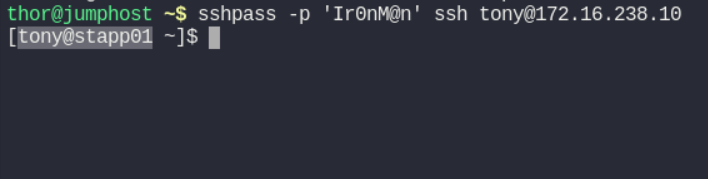
First of all let’s get connect with
App server 1withstapp01
172.16.238.10
tony
Ir0nM@n
ssh tony@172.16.238.10
Password: Ir0nM@n | Also with:
sshpass -p 'Ir0nM@n' ssh tony@172.16.238.10
Create the User with Specific UID and Home Directory
sudo useradd -u 1541 -d /var/www/ravi -m ravi-
u (UID)`-
d (Directory)-
mensures the home directory is created
Verify the user
raviwith given command.id ravi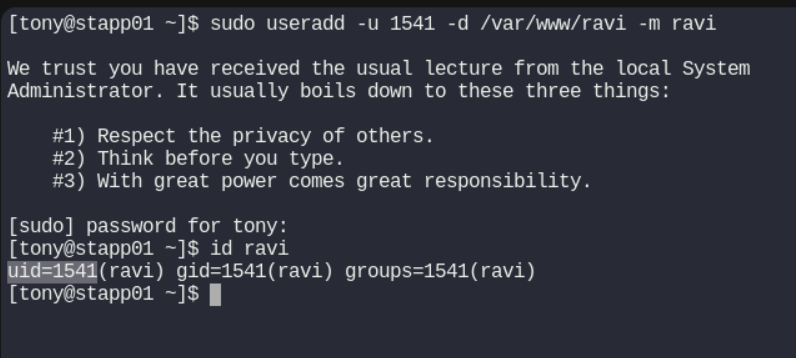
Also check the home directory:
ls -ld /var/www/ravi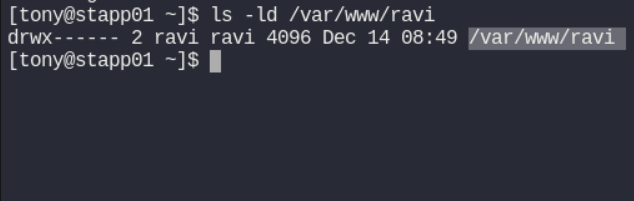
#linux #uid #happylearning


